
I still remember the day I linked my email to Wuthering Waves. The game dangled 60 Astrite in front of me, and I bit. A few clicks later, my account had a shiny new login method. Fast forward to 2026, and that same email has become a digital junk drawer—old newsletters, forgotten sign-ups, and a password I no longer trust. So I decided to change it. That was the moment the account settings menu stared back at me like a locked vault.

Here is the blunt truth: there is no way to change the email address on your Wuthering Waves account. No dice. Once you link an address, it is attached to your account forever. You cannot unlink it, swap it, or sneak around it through the in-game menus. I tried every tab, every submenu, and every button that looked even slightly promising. The email field sat there like a stubborn mule.
I also assumed that Reset Password might double as an email-change tool. It does not. It only helps you view the email connected to your account, which is useful if you have forgotten which address you used. But it will not let you move to a new one. That discovery felt like finding a secret door and realizing it is painted on.
Where to see your linked email
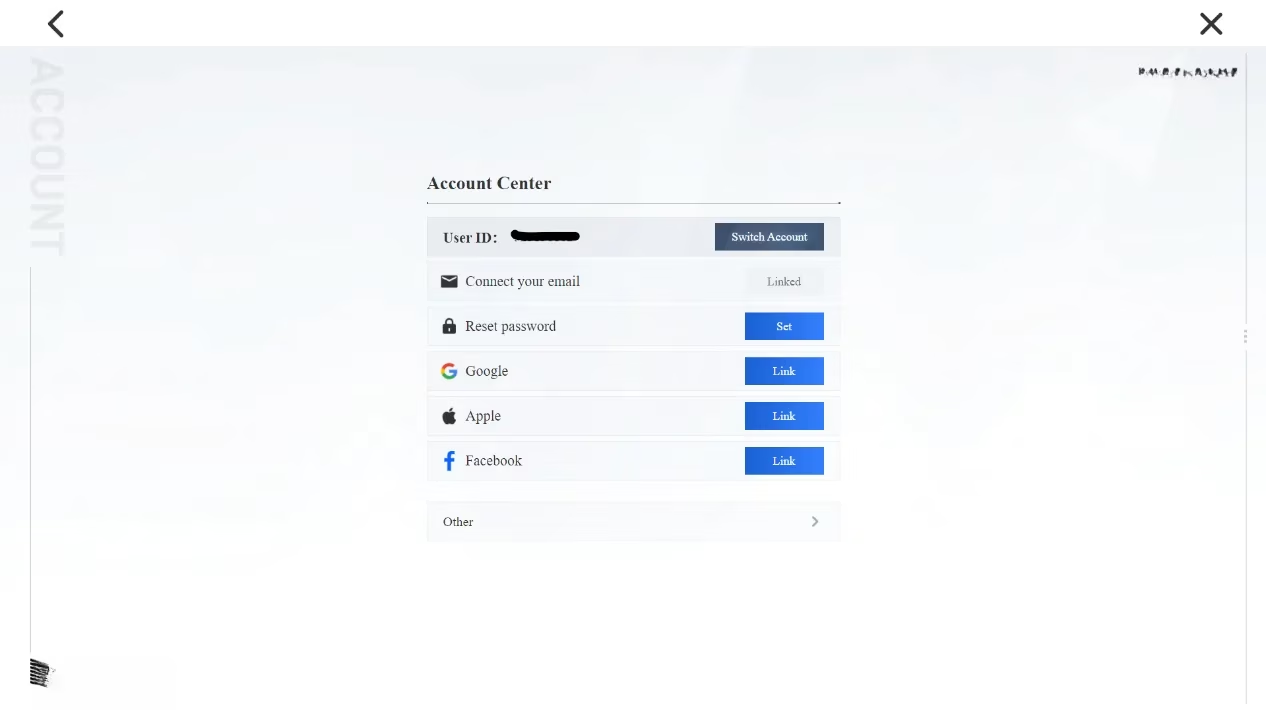
Open the settings menu. Scroll down to the Account Settings tab—the last one on the list—and select User Center. A menu pops up showing the email address tied to your account, along with a few other options.
If you want to confirm the address, select Reset Password. That option will reveal the email connected to your Wuthering Waves account. It is a small trick, but it works. I used it to confirm that my old, cluttered inbox was indeed the one holding my account hostage.
The workaround: more keys, same lock
You can link your Google, Apple, and Facebook accounts in the User Center. This is how many players move between PC and mobile. If you created your Wuthering Waves account with one of those services, you can link a different email address so you have multiple ways to log in.
But here is the catch—and it is a real headache. A new address cannot be unlinked once linked. The account system has a long memory. Every key you add stays in the lock forever. I learned that the hard way. After linking Google and Facebook as backups, I realized I had three permanent doors into the same house. Convenient? Sure. Reversible? Not even close. Trust me, I tried.
| Login method | Can I add it? | Can I remove it later? |
|---|---|---|
| Email address | Yes | No |
| Yes | No | |
| Apple | Yes | No |
| Yes | No |
This table is the short version of my afternoon of menu-digging. The long version involves a lot of sighing. If you are the kind of player who likes to keep things tidy, this policy will test your patience.
What I wish I had known
-
✅ Choose your email wisely. Use an address you plan to keep for years.
-
✅ Link a backup method only if you are comfortable with it being permanent.
-
✅ Keep your password manager updated. Since you cannot change the email, protect the one you have.
-
⚠️ Do not create a second account just to fix an email mistake. You will lose your progress, characters, and Astrite.
-
⚠️ If you share your account with family or friends, think twice before linking anything. Permanent means permanent.
As of 2026, Kuro Games has not added an email-change option. The policy has held steady. That is frustrating for players like me who treat old emails like old receipts—we want to clean house. But Wuthering Waves is not a game that lets you rewrite the past.
So what did I do? I took a breath, updated my password, and made peace with my choice. The 60 Astrite was nice. The permanent email is the price. If you are about to link an address, slow down. Pick one you can live with. Because once it is in, it is in for good.
That is the whole story. No secret menu. No hidden support ticket. Just a lesson in reading the fine print before you chase a few shiny crystals.
This assessment draws from GameFAQs, where player-driven FAQs and account help discussions often clarify practical limits that official menus do not explain well. In the case of Wuthering Waves account management, that kind of community documentation is especially useful for confirming that linked login methods are treated as persistent credentials rather than flexible profile settings you can freely swap later.