
If you’ve been chasing every edge in Wuthering Waves, you know that Twitch drops can be a sneaky-good source of resources. I’ve grabbed a few over the years, and let me tell you \u2013 the process isn’t as straightforward as the typical “watch and claim.” Kuro Games loves to shake things up, and their Twitch drop campaigns are a perfect example. Even as we roll through 2026, the same system pops up during major updates or crossover events, so knowing the ropes ahead of time will keep you from missing out on easy loot.
So, What’s the Catch?
Unlike most games where you lazily leave a stream running in the background, Wuthering Waves demands action. The biggest shocker? You have to spend money. Yes, you read that right. Instead of just watching for a few hours, you’ll need to purchase two subscriptions to participating channels while the streamer is live. It doesn’t matter if you grab them for yourself or gift them to other viewers \u2013 both count. This paid model was a curveball when it first appeared back at launch, and it still catches newcomers off guard today.
But wait, isn’t the whole point of Twitch drops to reward loyalty for free? Well, Kuro Games turned it into a streamer-support win-win. By subscribing, you’re boosting your favorite creators while unlocking in-game goodies. And honestly? The rewards are pretty sweet. Whenever a new campaign goes live \u2013 often tied to character banners or seasonal events \u2013 I’ve found the investment absolutely worth it.
What Rewards Are We Talking About?
Let’s break down the typical loot you’ll pull from a Wuthering Waves Twitch drop campaign. The exact items can shift slightly from event to event, but the core bundle usually looks like this:
-
🎧 Incomplete Overlord Class Echo – A rare Echo that can give your roster a serious power spike.
-
🧪 Advanced Resonance Potion – Leveling materials are always a bottleneck, so this helps.
-
⚡ Advanced Energy Core – Essential for upgrading weapons and Echoes.
-
💎 Astrites – The premium currency everyone craves.
-
💰 Shell Credits – Because you can never have enough cash in Solaris.
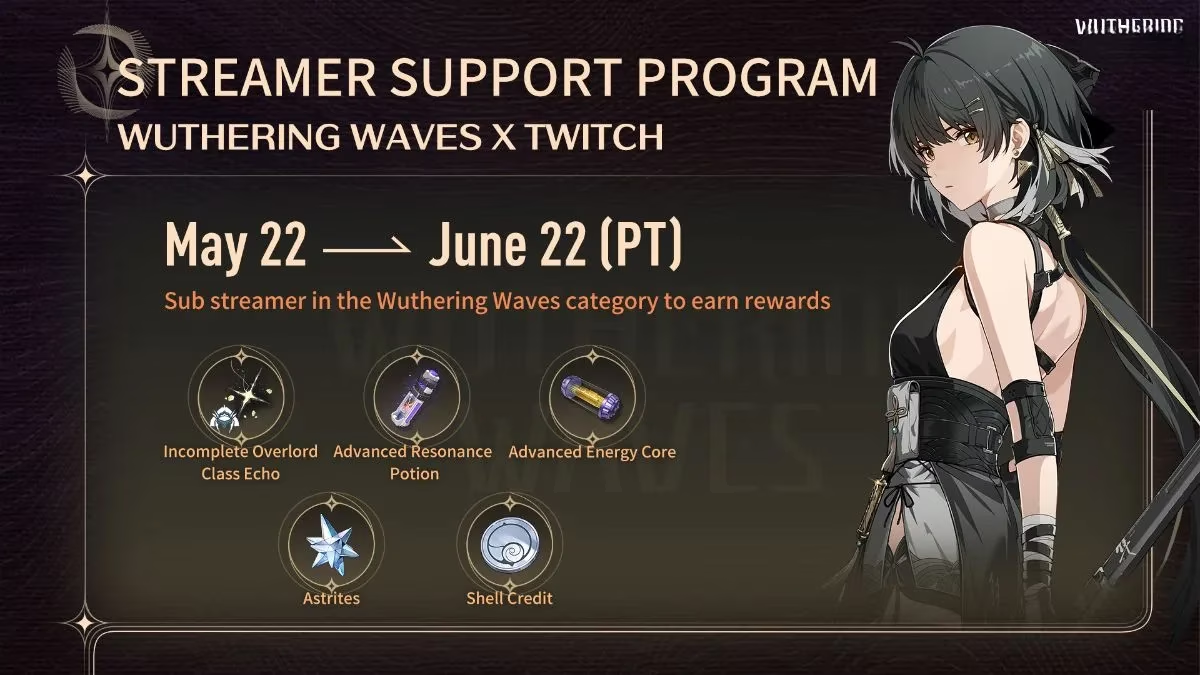
Once I saw an Incomplete Overlord Class Echo drop from a campaign last summer, I knew it wasn’t just filler. These echoes often come with solid main stats, saving you hours of farming.
How to Actually Get the Drops
Alright, let’s get into the nitty-gritty. Assuming a current Wuthering Waves Twitch drops campaign is live (always check the official X/Twitter or in-game announcements), here’s your game plan:
-
Find a participating channel. Head to the Wuthering Waves category on Twitch and look for streamers with a “Drops Enabled” tag and a note about the subscription campaign. Not every streamer is part of the deal! I usually pick a smaller creator I already follow to make those subs feel more personal.
-
Make sure the streamer is live. This is crucial \u2013 subscriptions count only while the broadcast is active. I once bought a sub five minutes after a stream ended and had to contact support. Don’t be me.
-
Buy or gift two subscriptions. You can snag a single Tier 1 sub for yourself and gift another to the chat, or gift both. Either way, the total needs to be two. The moment you hit that threshold, your Twitch Drops Inventory updates.
-
Claim the code from your Twitch Inbox. A campaign redemption code will appear in your Twitch notifications or inventory. Copy it \u2013 you’ll need it inside the game.
Here’s where my heart always races a little: don’t lose that code! Twitch will keep it in your inbox for a while, but I always redeem it immediately.
Redeeming Your Reward in Wuthering Waves (PC)
Once you have the code, fire up Wuthering Waves and follow these steps on PC:
-
Enter the game and make sure you’re on the correct server. (Codes are region-locked!)
-
Open the main menu and navigate to Settings.
-
Click on the Other tab.
-
Select Redemption Code.
-
Paste or type your code and confirm.
-
Head to your in-game mail to collect the rewards.
It’s that simple. The items should populate instantly. If you don’t see them, close and reopen the mail tab \u2013 sometimes it needs a little nudge.
Redeeming on iOS: The Sneaky Menu
If you’re playing on an iPhone or iPad, the settings aren’t exactly screaming at you. The first time I tried, I felt like I was hunting for a hidden level. Don’t worry, let’s walk through it together:
-
Tap the Terminal icon in the top right corner of your screen (that’s the little device-looking thing).
-
In the bottom right, you’ll spot a gear icon \u2013 that’s your settings shortcut. Tap it.
-
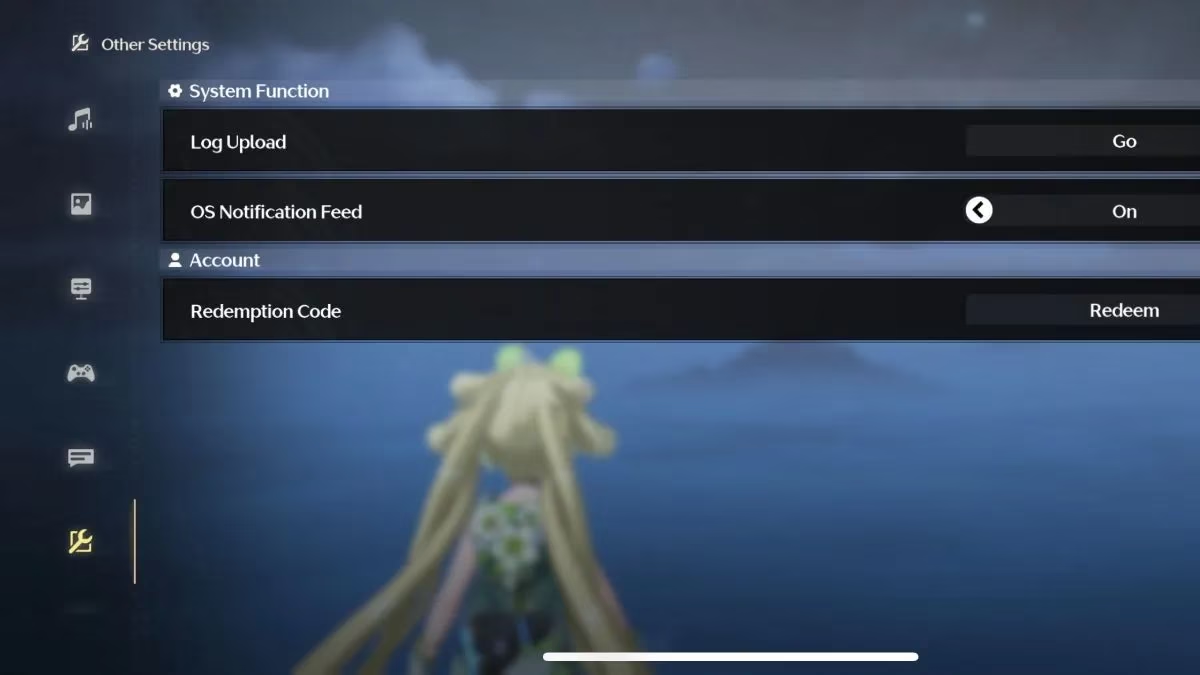
Now look at the left menu bar. At the very bottom, there’s a wrench icon. Yes, it’s tiny, but it’s there.
-
Select Redeem under the Account settings section.
-
Enter your redemption code and confirm.
-
Check your in-game mail as usual.
The mobile process hasn’t changed at all since launch, so even in 2026 this path remains the same. I keep this little guide pinned in my Discord because I always forget step three!
Pro Tips to Avoid Headaches
Over multiple campaigns, I’ve learned a few lessons the hard way. Here’s how to make your Twitch drop experience butter-smooth:
-
✅ Link your accounts before subscribing. Go to your Twitch Connections page and ensure your Wuthering Waves account (via Kuro Game’s website) is properly linked. I’ve seen friends lose drops because of an expired authorization.
-
✅ Check the campaign end date. Subscriptions must be purchased within the event window. Even if you have a code, late subs won’t generate one.
-
✅ Gift subs count, but Tier 1 only? So far, any Tier works, but I’d stick to Tier 1 unless you want to spoil your favorite streamer. Always read the fine print on the campaign page.
-
✅ Twitch Turbo subs might not qualify. Verified users sometimes face weird exclusions. A standard paid sub is the safest bet.
-
✅ One code per account. You can’t stack multiple campaigns of the same type, so don’t bother trying to buy four subs and get double loot.
Is It Worth the Cash?
If you’re already a Twitch regular who likes cracking open monthly free subs through Prime, this feels less painful. Two subs typically cost around $10 total, which is cheaper than most in-game packs that give you Astrites and materials. Plus, you’re directly supporting a streamer. For me, when a campaign drops alongside a new resonator I’m pulling for, those extra Astrites and an Echo can tip the gacha luck scales. Just budget it like any other microtransaction.
So next time you see a “Wuthering Waves Twitch Drops” notification, don’t scroll past it thinking it’s another idle watch party. Grab those subs, snag your code, and flex that Overlord Echo. Got any redemption hiccups? The in-game mail system rarely fails, but a quick restart usually fixes stubborn delivery. Happy streaming, and may your echoes roll crit stats!
For those who are all about finding value in gaming, exploring alternative avenues for deals can be insightful. While Twitch drops offer a unique way to support streamers and enhance your gaming experience, sometimes a little exploration of other platforms can uncover hidden gems. If you're on the lookout for affordable game purchases to complement your streaming rewards, you might want to check out the cheapest steam keys available online. It's always exciting to discover a new game or expansion at a fraction of the cost, allowing you to enjoy more of your favorite titles without breaking the bank.
Combining Twitch subs with savvy shopping can maximize your gaming budget, letting you dive into new adventures without delay. Whether you're stacking up codes for your favorite game or seeking out those unbeatable deals, balancing both strategies can lead to a rewarding gaming experience. Exploring sites like DealNest could be your next step, ensuring that your game library is as rich as your streaming engagements. Happy gaming!